
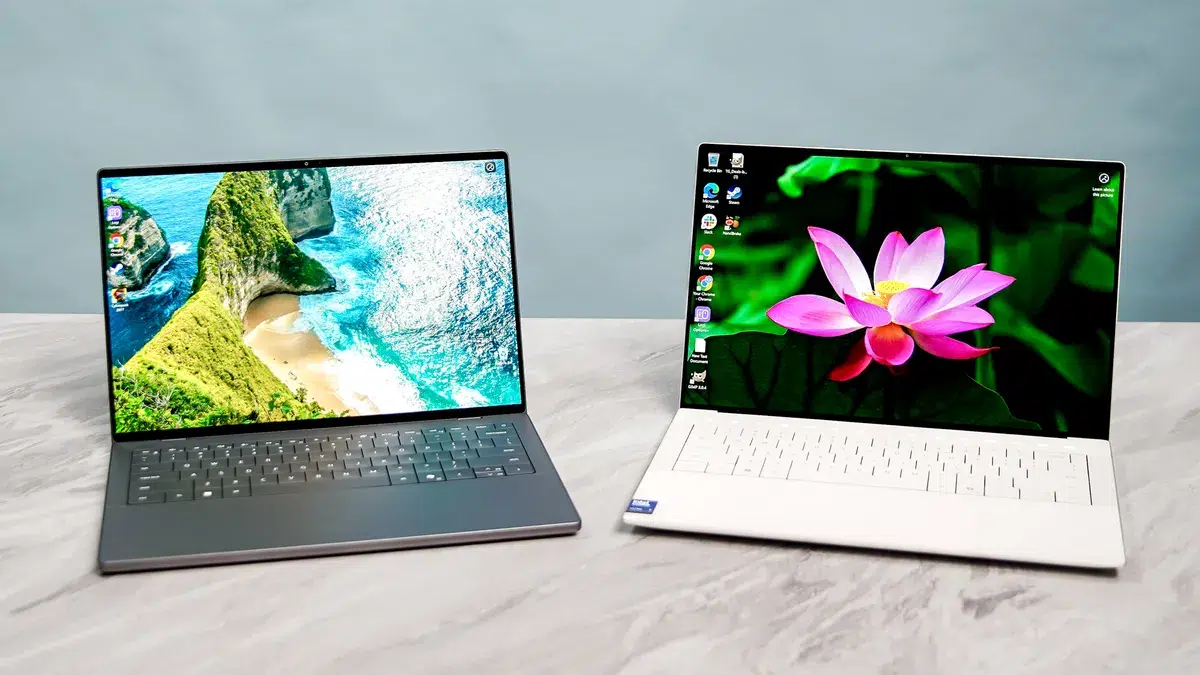
Dell 14S vs Dell XPS 14: Which Laptop Should You Buy in UAE?
Choosing between the Dell 14S and Dell XPS 14 starts with a simple question: what will you actually do with your laptop?
For office work, studying, browser-based tools, and everyday multitasking, the Dell 14S deserves a place on your shortlist. For buyers who want a high-resolution OLED display and dedicated NVIDIA graphics, a suitably configured XPS 14 9440 offers a different set of benefits.
However, the model number matters. This guide focuses on the Dell 14S DS14260 and Dell XPS 14 9440 configurations listed by UAE Tech Dubai, helping buyers in Dubai and across the UAE choose based on their workload.
First, Check Which Dell XPS 14 You Are Comparing
The XPS 14 9440 appears on UAE Tech Dubai with Intel Core Ultra 7 155H configurations. The newer XPS 14 DA14260 is a separate model: Dell lists it with Series 3 processors and a 14-inch display. Its specifications should not be mixed with those of the 14.5-inch 9440.
The Dell 14S also needs a precise model reference. Here, that is DS14260.
Before comparing prices, match the full model number, processor, graphics, RAM, storage, and screen. A lower-priced listing may be a different configuration rather than a better deal.
Dell 14S vs Dell XPS 14: Key Specifications
The following comparison uses two specific configurations found on UAE Tech Dubai.
| Feature | Dell 14S DS14260 | Dell XPS 14 9440 |
| Processor | Intel Core Ultra 9 386H | Intel Core Ultra 7 155H |
| RAM | 32GB | 32GB |
| Storage | 512GB SSD | 1TB SSD |
| Display | 14-inch FHD+ touch | 14.5-inch 3.2K OLED touch |
| Graphics | Intel Graphics | NVIDIA GeForce RTX 4050, 6GB |
| Operating system | Windows 11 Home | Windows 11 Pro |
| Main buying consideration | Productivity, connectivity, and overall value | OLED display, dedicated graphics, and larger SSD |
These are individual store listings, not specifications shared by every Dell 14S or XPS 14. The store also lists XPS 14 configurations with integrated graphics.
Performance for Work, Study, and Creative Tasks
Office Work and Everyday Multitasking
If your day involves Excel, presentations, online meetings, accounting software, and browser tabs, the Dell 14S configuration is a sensible starting point.
Its listed 32GB memory gives you room for multitasking. For buyers who mainly use office applications, it is worth comparing the final price before paying extra for graphics hardware they may rarely use.
The XPS 14 configuration is also suitable for these tasks. However, its OLED screen and dedicated GPU are more relevant when your work benefits from those features.
You can explore other business laptops in the UAE if your purchase also needs specific company IT requirements.
Video Editing, Design, and Graphics Work
The listed XPS 14 9440 includes an RTX 4050 with dedicated graphics memory. That makes it the more relevant configuration to investigate for applications that benefit from NVIDIA GPU acceleration. The Dell 14S listing uses integrated Intel graphics.
This is a workload-based recommendation, not a claim that the XPS wins every performance test.
Check the requirements of your editing, rendering, or design software. Processor speed, cooling, graphics support, and available memory all affect the result. A Core Ultra 9 label alone does not settle a comparison against a laptop with dedicated graphics.
For gaming as a primary use, compare purpose-built gaming laptops in Dubai before deciding.
Display: Is the XPS OLED Screen Worth It?
The selected XPS 14 has a 3200 × 2000 OLED touchscreen, while the selected Dell 14S listing specifies an FHD+ touchscreen. The XPS therefore offers a higher-resolution display in this particular comparison.
For photographers, designers, and people who enjoy films on their laptop, the screen may justify a meaningful part of the price difference. For spreadsheets, email, and document work, an FHD+ display may be sufficient.
Do not assume every Dell 14S has the same panel. Dell documents multiple DS14260 display options, including FHD+, QHD+, and OLED versions, with different brightness and colour specifications.
For Dubai buyers working near bright windows or in cafés, ask about brightness, screen coating, and reflections. “Touchscreen” describes an input feature; it does not tell you everything about image quality.
Portability and Battery Life
A laptop’s travel weight includes its charger and any adapters you need.
Dell lists the DS14260 at a minimum of approximately 1.45kg with a non-touch display or 1.50kg with touch, depending on configuration. Check the weight of the exact unit you intend to purchase.
Battery life needs similar care. A result from an XPS 14 DA14260 review should not be presented as a result for an XPS 14 9440.
Compare tests that identify the exact processor, screen, power settings, and workload. Video playback, Team calls, and editing projects place different demands on a laptop.
If you regularly move between university, home, and client meetings, prioritise realistic battery evidence over a headline claim of “all-day” use.
Ports, RAM, and Storage
Connections for Your Desk
The Dell 14S DS14260 includes two USB-A ports, two Thunderbolt 4 ports, HDMI, and a headset connection. This is useful when connecting existing office equipment or a meeting-room display.
The listed XPS 14 9440 provides three Thunderbolt 4 ports, a headset connection, and a microSD card reader. Check whether your HDMI monitor or USB-A accessories will need an adapter.
Include those accessories when comparing the total purchase cost.
Choose Enough Memory at Purchase
Dell states that the DS14260’s onboard RAM cannot be upgraded. Buy the memory capacity you expect to need over the laptop’s working life.
For general office use, 16GB can be a practical starting point. Consider 32GB for heavier multitasking, larger projects, or development tools.
Storage deserves separate attention. The selected XPS has twice the listed SSD capacity of the selected 14S. That difference matters if you keep videos, project files, or large photo libraries locally.
Dell 14S and Dell XPS 14 Prices in the UAE
Compare the final AED price for the exact configuration.
During research, retrieved Dell 14S category listings showed different prices. That makes a current quotation more dependable than repeating one figure as a fixed price.
When checking the Dell XPS 14 price in UAE, compare like-for-like specifications. An integrated-graphics version should not be priced against an RTX model without recognising the hardware difference.
Before paying, confirm:
- The complete model number and specifications.
- Whether the final quotation includes VAT and delivery.
- Product condition and keyboard layout.
- Warranty provider, duration, and coverage in the UAE.
- Included charger and any required adapters.
- Return terms and estimated delivery date.
A clear written quotation helps you assess the whole purchase.
Which Laptop Should You Buy?
Choose the Dell 14S for Productivity and Practical Connections
Shortlist the Dell 14S if you spend most of your time in office software, web applications, online classes, or coding tools.
Its built-in HDMI and USB-A connections are useful for existing accessories. The listed 32GB configuration is also worth considering if you keep several applications open throughout the day.
It becomes the stronger value choice when its confirmed price is meaningfully lower and you do not need the XPS configuration’s dedicated GPU or higher-resolution screen.
Choose the XPS 14 for Its Specific Display and Graphics Benefits
Consider the Dell XPS 14 9440 with RTX 4050 if the OLED touchscreen, NVIDIA graphics, and 1TB SSD match your work.
For a creative professional, those features may be worth paying for. For someone mainly answering email and editing documents, they may have less practical value.
Choose the configuration that solves your needs rather than assuming the XPS name automatically makes every version better.
Buy Your Dell Laptop from UAE Tech Dubai
For productivity and useful everyday connections, shortlist the Dell 14S DS14260. For the particular combination of OLED, RTX graphics, and larger storage discussed here, consider the Dell XPS 14 9440.
Browse laptops at UAE Tech Dubai or contact UAE Tech Dubai (Berjaya Electronics) with your budget and main applications. Confirm the current price, configuration, and warranty, then order the Dell laptop that fits your work in Dubai or anywhere across the UAE.
Is the Dell 14S Better Than the Dell XPS 14?
It depends on the configuration and your priorities. The 14S can be the more practical productivity purchase, while the selected XPS 14 9440 offers a higher-resolution OLED screen and dedicated NVIDIA graphics.
Does Every Dell XPS 14 Have an NVIDIA GPU?
No. UAE Tech Dubai lists an XPS 14 9440 with Intel Arc graphics, alongside NVIDIA-equipped configurations. Read the graphics specification before ordering.
Which Is Better for Students in Dubai?
Choose according to your course. General study and office tasks favour value and portability. Design, engineering, or media courses may need particular software and graphics capabilities, so check your university’s requirements first.
Should I Buy the Newer XPS 14 Instead?
Compare it separately. The XPS 14 DA14260 is a different generation from the 9440 discussed here. Request its exact specification and UAE price before deciding whether its features justify the cost.