

The Dell Pro Max 14 Premium vs Lenovo ThinkPad X1 Carbon decision comes down to what you need to carry between meetings: dedicated workstation graphics or a particularly light business laptop. Both can suit professionals in Dubai, UAE, but they serve different priorities.
Quick verdict: shortlist the Dell when your software benefits from an NVIDIA professional GPU and you need the listed 64GB configuration. Shortlist the ThinkPad when frequent travel, office productivity and carrying comfort matter more than dedicated graphics. Here we compare the Dell Pro Max 14 Premium MA14250 with the ThinkPad X1 Carbon Gen 14 Aura Edition 21V7CTO1WWUS7H, rather than mixing specifications from unrelated generations.
The two configurations at a glance
| Feature | Dell Pro Max 14 Premium | ThinkPad X1 Carbon Gen 14 |
|---|---|---|
| Processor | Core Ultra 7 265H vPro Enterprise | Core Ultra 7 356H |
| Graphics | RTX PRO 1000 Blackwell, 8GB dedicated memory | Integrated Intel Graphics |
| System memory | 64GB | 32GB |
| Storage | 1TB SSD | 1TB SSD |
| Display listing | 14-inch QHD+ OLED touch | 14-inch 2.8K OLED touch |
| Operating system | Windows 11 Pro | Windows 11 Pro |
| Listed price | AED 21,361 | AED 13,400 |
| Availability at check | In stock | On backorder |
These are seller-listed configurations and dated prices, not every option offered by either manufacturer. Confirm the exact part number, panel specification and current stock when requesting a quotation. In particular, compare the full processor code: two “Core Ultra 7” labels do not establish equal performance.
Workstation graphics: where the Dell has a clear distinction
The Dell listing includes an NVIDIA RTX PRO 1000 Blackwell GPU with dedicated graphics memory. Dell’s graphics documentation confirms RTX PRO 1000 and 2000 Blackwell options for this family, each with 8GB GDDR7. The GPU in your quotation matters more than the family name.
That makes this Dell configuration the more relevant starting point for work that explicitly needs NVIDIA GPU acceleration. For architecture, engineering or design, check the requirements of your AutoCAD, Revit, SolidWorks or rendering workflow, including the software release and supported driver. Dedicated graphics are a capability difference, not proof of a fixed performance advantage in every task.
For example, an architect editing drawings and running browser-based project tools may have different requirements from a visualisation specialist producing complex rendered scenes. Ask for a test using your representative project before buying a workstation primarily for that application.
Ultralight portability: why the ThinkPad deserves consideration
For consultants moving between client offices, executives travelling through DXB and teams working across several locations, carrying comfort is a daily benefit. Count the charger, adapters and accessories alongside the laptop itself.
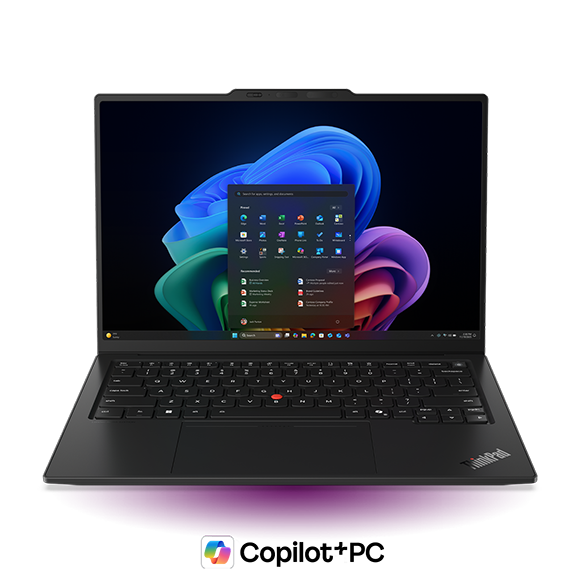
Dell specifies a minimum weight of 1.61kg for the Pro Max 14 Premium. Lenovo lists starting weights of 0.977kg or 0.998kg for X1 Carbon Gen 14 variants, depending on touchpad type. These are family starting figures, not guaranteed weights for the OLED-touch configurations linked here. Actual configuration and accessories change the total. See Dell’s weight specification and Lenovo’s X1 Carbon Gen 14 PSREF.
The ThinkPad is therefore the stronger portability shortlist if you mainly work in documents, spreadsheets, presentations, browser applications and video meetings. If demanding rendering happens on a separate workstation or remote service, you may have less reason to carry a dedicated GPU everywhere.
Core Ultra 7 265H vs 356H: do not judge by the badge alone
These are different processors in different laptop designs. A newer series or higher number does not by itself prove that one complete laptop will be faster at your job. Cooling, power settings, memory and software behaviour all affect the result.
Lenovo’s PSREF identifies the 356H with integrated Intel Graphics; do not assume it has the Arc B390 graphics associated with selected Core Ultra X7 configurations. If an application requires a particular GPU or graphics API, check that requirement against the actual processor and graphics specification.
For a purchasing decision, compare the time needed to complete your normal export, calculation or build while using the same settings. For meetings and document work, evaluate responsiveness, keyboard comfort and display readability instead of paying solely for a benchmark ranking.
32GB vs 64GB RAM: choose before you buy
The compared Dell listing has twice the system-memory capacity of the ThinkPad listing. That difference can matter for several virtual machines, large datasets or keeping demanding applications open together. It does not mean the Dell is automatically twice as fast.
Both model families use onboard memory rather than a straightforward user RAM upgrade. Dell documents non-upgradable onboard RAM, and Lenovo’s PSREF lists soldered memory. Select sufficient capacity at purchase; do not assume you can add a memory stick later.
If your existing work regularly approaches its RAM limit, measure that usage before choosing. If it does not, the money saved may be more useful for a monitor, backups or the support arrangement your business needs.
OLED screens, battery life and a practical office setup
Both linked listings describe OLED touchscreens. Compare the actual resolution, finish and scaling settings before ordering, especially if you spend hours reading small text or reviewing detailed plans. A visually impressive display should also be comfortable for your everyday documents.
There is no battery-runtime winner claimed here because these exact units have not been tested together. Screen brightness, video calls, background software and GPU usage can change runtime substantially. For a travel-focused purchase, request evidence that reflects your routine rather than relying on a maximum battery-life headline.
At a fixed desk, browse our monitors for business work and laptop accessories. Before buying a dock, confirm the laptop’s port capabilities, supported displays and charging requirements. A convenient single-cable setup still needs compatible hardware.
Which is the better business laptop for your work in Dubai?
- Architecture, engineering or GPU-dependent creative work: start with the Dell and validate software compatibility, project performance and the 8GB VRAM requirement.
- Frequent business travel and client meetings: start with the X1 Carbon, then check the exact unit’s carrying weight, screen and battery behaviour.
- Finance, operations and general office teams: compare both with other business laptops in Dubai, UAE. Dedicated workstation graphics may not be a purchasing priority.
- Heavy workloads with a preference for a larger screen: also examine the Dell Pro Max 16 Premium, comparing the entire CPU, GPU and memory configuration rather than screen size alone.
Price, availability and the quotation checklist
The Dell Pro Max 14 Premium price in Dubai and the ThinkPad X1 Carbon price in Dubai should be compared against what you actually receive. At our 6 November 2026 check, the linked Dell was listed at AED 21,361 and in stock; the linked ThinkPad was AED 13,400 and on backorder. Use the product pages for current figures. A backordered laptop may not suit an urgent deployment even when its specification is attractive.
For either model, request written confirmation of the full SKU, processor, GPU, RAM, display, keyboard layout and Windows edition. Confirm warranty provider and duration, applicable VAT, delivery cost and expected arrival date. Contact UAE Tech Dubai’s sales team with your software list and deadline so the quotation addresses the actual purchase.
Frequently asked questions
Is the Dell Pro Max 14 Premium better than the ThinkPad X1 Carbon?
It is the more relevant choice when the listed NVIDIA GPU and 64GB RAM are requirements. The ThinkPad deserves priority when carrying comfort and business productivity are your main needs. There is no single winner for every buyer.
Does this ThinkPad X1 Carbon have a dedicated NVIDIA GPU?
No. The linked Core Ultra 7 356H configuration is listed with integrated Intel Graphics. Choose according to your application requirements rather than assuming all premium laptops have discrete graphics.
Which laptop is better for AutoCAD or Revit?
Start by checking your application version, project size and graphics requirements. The Dell’s dedicated RTX PRO GPU makes it a logical workstation candidate, but request project-specific validation instead of assuming a certification or benchmark result.
Can I upgrade the RAM later?
These families use onboard or soldered memory. Select the capacity you need when ordering and verify it against the exact SKU.
Conclusion: buy for the work you do most
Choose the Dell Pro Max 14 Premium when a dedicated professional GPU and the listed 64GB RAM configuration justify the extra carrying weight and cost. Choose the ThinkPad X1 Carbon when a light business laptop is the better fit for your working day.
At UAE Tech Dubai, customers in Dubai, UAE can explore valuable products including Dell professional laptops, Lenovo ThinkPads, business laptops, monitors and accessories for a complete setup. Browse the linked products and confirm current stock or backorder lead times with our team before ordering. We can help you compare the available configurations around your software, budget and delivery deadline.
Research note: this comparison uses manufacturer specifications and the linked store listings, checked on 6 November 2026. It is a specification-based buying guide, not a hands-on performance or battery test. Prices and availability can change.



Leave a Comment
Your email address will not be published. Required fields are marked *