
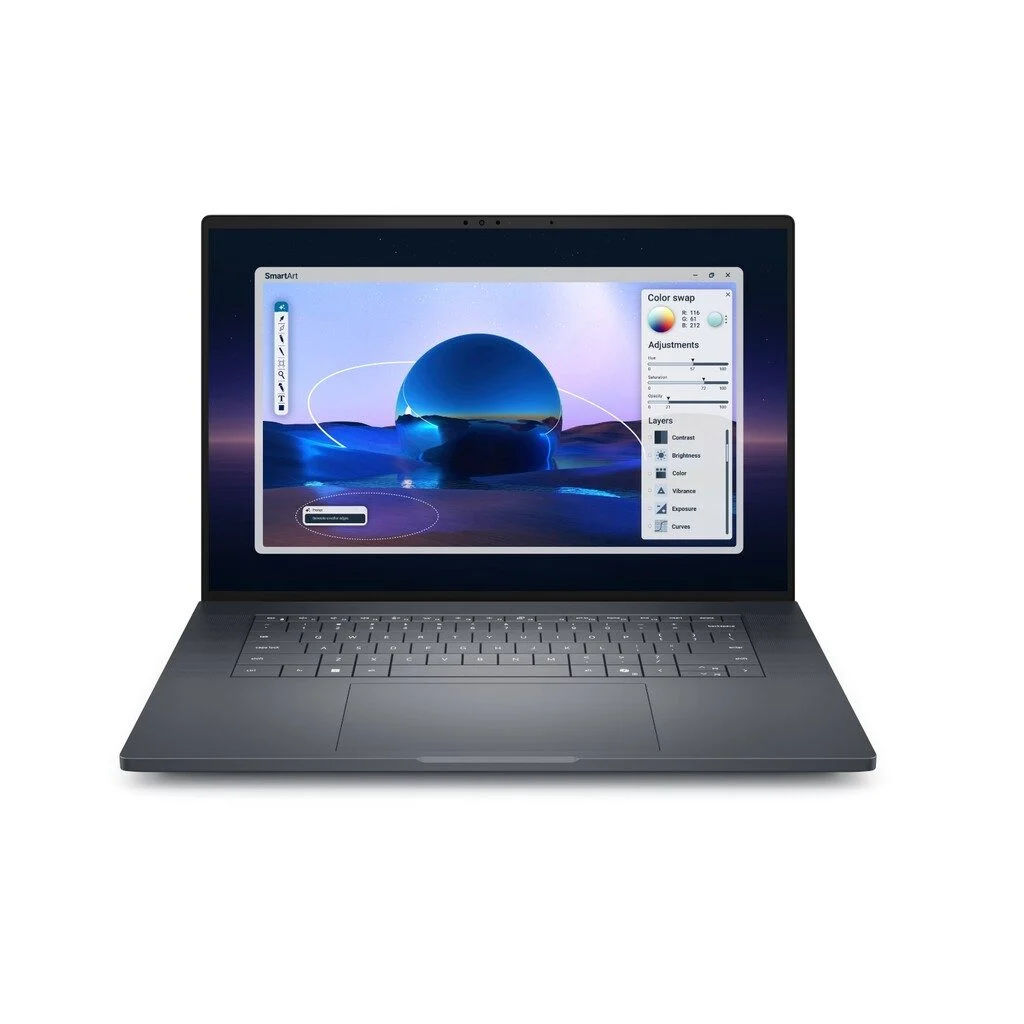
Choosing between Dell Pro Max 16 Premium configurations is easier when you start with your workload rather than the biggest processor number. For buyers in Dubai, UAE, the useful question is whether your budget should go towards a Core Ultra 9 processor, a stronger NVIDIA RTX PRO GPU, more memory, or a better desk setup.
Quick answer: consider Core Ultra 7 with an appropriate RTX PRO GPU for a balanced professional laptop. Consider Core Ultra 9 when your actual applications justify the CPU upgrade. If graphics memory is your limitation, changing the processor will not solve it. This guide explains the MA16250 family and the specific Dell Pro Max 16 Premium configuration listed at UAE Tech Dubai.
Which Dell Pro Max 16 Premium are you comparing?
Check the model code MA16250. Dell Pro Max 16, Pro Max 16 Premium and Pro Max 16 Plus are different families; specifications from one should not be applied to another. Within the Premium family, a common chassis name still does not guarantee the same processor, graphics, screen or memory.
Dell documents the options below for this family. They are supported platform options, not a promise that every combination is available from our store. Ask for the complete configuration on your quotation before ordering.
Core Ultra 7 vs Ultra 9: what changes?
| Processor | Cores / threads | Maximum turbo | Management designation |
|---|---|---|---|
| Core Ultra 7 255H | 16 / 16 | Up to 5.1 GHz | Check the exact configuration |
| Core Ultra 7 265H | 16 / 16 | Up to 5.3 GHz | vPro Enterprise |
| Core Ultra 9 285H | 16 / 16 | Up to 5.4 GHz | vPro Enterprise |
All three are listed with 24MB cache and a 45W processor rating. The Ultra 9 does not add cores in this comparison. Maximum turbo is a peak specification, not a sustained operating speed or an application benchmark. See Dell’s MA16250 processor specifications.
When Core Ultra 7 is the sensible starting point
Build a shortlist around the 265H if you need a workstation for mixed office work, design applications, project coordination and occasional demanding jobs. Before spending more on the processor, check whether your current slowdowns come from insufficient RAM, a full SSD or GPU-heavy rendering. Buying a stronger CPU while leaving the real bottleneck unchanged can be poor value.
When to consider Core Ultra 9
Consider the upgrade if long CPU-bound tasks consume billable time and a representative test shows a worthwhile improvement. Ask for a comparison using the same project, application version, power profile and GPU. A brief benchmark score alone will not tell an engineering consultancy how a lengthy simulation or export behaves.
For an IT-managed business purchase, also discuss vPro requirements with your administrator. Management features and rendering speed solve different problems; a familiar badge should not replace a deployment checklist.
RTX PRO 1000 vs 2000 vs 3000 Blackwell
| GPU | Dedicated graphics memory | What to check before paying more |
|---|---|---|
| RTX PRO 1000 Blackwell | 8GB GDDR7 | Whether it meets your application’s graphics and driver requirements |
| RTX PRO 2000 Blackwell | 8GB GDDR7 | Measured performance in your workload; memory capacity remains 8GB |
| RTX PRO 3000 Blackwell | 12GB GDDR7 | Whether your scenes or datasets need more graphics-memory headroom |
The available GPU names and memory capacities are documented in Dell’s Pro Max 16 Premium specification sheet. Confirm the CPU/GPU pairing on the exact unit. Integrated-graphics configurations also exist; the model name alone does not establish that an NVIDIA GPU is installed.
System RAM and GPU memory are separate. A 64GB RAM laptop with an 8GB GPU does not become a 64GB graphics card. Likewise, moving from 8GB to 12GB VRAM does not establish a particular percentage increase in rendering speed. Application support, project complexity and the laptop’s power limits still matter.
Choosing a laptop for AutoCAD, Revit, SolidWorks or video editing
When comparing a mobile workstation in Dubai, request a test that resembles your work. A small demonstration model can hide the difficulties of a large project with linked files, textures and background applications.
- CAD and BIM: check the software vendor’s requirements and certification information for your exact release, GPU and driver. Test a typical assembly or building model rather than assuming every RTX PRO configuration is certified for every application.
- 3D rendering: establish whether your renderer uses the CPU or GPU, then check scene-memory requirements. A GPU upgrade is useful only where the renderer supports and benefits from it.
- Video editing: test the codecs, timeline resolution and effects you use. Budget for working storage and backups as well as compute performance.
- Local AI development: confirm framework compatibility and model-memory requirements. An “AI PC” label does not guarantee that a particular model fits or runs efficiently.
If your day is predominantly email, spreadsheets and browser-based work, compare the workstation against our business laptops in Dubai, UAE. Your budget may deliver more practical value through portability, a suitable screen and dependable support.
64GB RAM, 1TB SSD and display: finish the configuration
Choose memory around the applications you keep open together. Larger datasets, several virtual machines and complex creative projects can justify more capacity, while a lighter workflow may not use it. Check the exact model’s upgrade provisions before treating a lower-memory purchase as something you can expand later.
A 1TB SSD is a useful starting capacity, but video assets, project versions and local datasets can grow quickly. Separate working files from your backup plan. At a permanent desk, compare external monitors for workspace and readability, and check dock compatibility before selecting laptop accessories.
For display selection, verify resolution, touch support and the colour requirements of your work. A high-resolution panel may help detailed review, but it does not replace calibration or an application-specific performance check.
Dell Pro Max 16 Premium price in Dubai, UAE
At our check on 6 November 2026, UAE Tech Dubai listed the MA16250 with Core Ultra 7 265H vPro, 64GB RAM, 1TB SSD, RTX PRO 2000 Blackwell 8GB, a 16-inch FHD+ display and Windows 11 Pro at AED 14,900. The item was marked on backorder, so confirm the expected supply date before arranging your project around it. This is one listed configuration, not a price for every Ultra 7 or Ultra 9 model.
Use the linked product page for the latest price and status. For a business quotation, confirm the complete CPU and GPU specification, keyboard layout, warranty provider and duration, applicable VAT, delivery charges and lead time. Check our contact page for purchase assistance rather than assuming an unconfirmed delivery or support promise.
Frequently asked questions
Is Core Ultra 9 worth it over Core Ultra 7?
It depends on the extra cost and the tasks that slow you down. Compare a real workload on otherwise equivalent configurations. For GPU-limited work, allocating the budget to graphics or memory may be more useful.
Is RTX PRO 2000 8GB enough for professional work?
There is no universal answer. Check the software requirements and your project’s memory use. If a project exceeds available VRAM, a stronger CPU does not remove that constraint.
Can I assume every MA16250 has the same specification?
No. The family includes different processor and graphics options. Match the quotation to the exact configuration, including RAM, SSD, display and operating system.
Can I order the listed configuration for delivery in Dubai?
Contact UAE Tech Dubai with the product link and delivery location. Confirm the current backorder lead time, final payable total and delivery arrangements before placing the order.
Conclusion: choose the configuration that earns its place in your workflow
Start with the workload, identify its limiting component, then compare complete quotations. A balanced Core Ultra 7 system can be the right purchase; Core Ultra 9 or a higher RTX PRO option should have a clear purpose in your work.
UAE Tech Dubai offers a range of valuable technology products for customers in Dubai, UAE, including Dell professional laptops, Lenovo ThinkPads, business laptops, monitors and accessories. Explore the available products and ask our team to confirm stock or backorder availability for your preferred configuration. The aim is a complete setup that fits your work and budget.
Research note: this is a specification-based buying guide using Dell documentation and the linked store listing, checked on 6 November 2026. It does not present hands-on testing or measured performance results. Prices, availability and configuration options can change.



Leave a Comment
Your email address will not be published. Required fields are marked *