
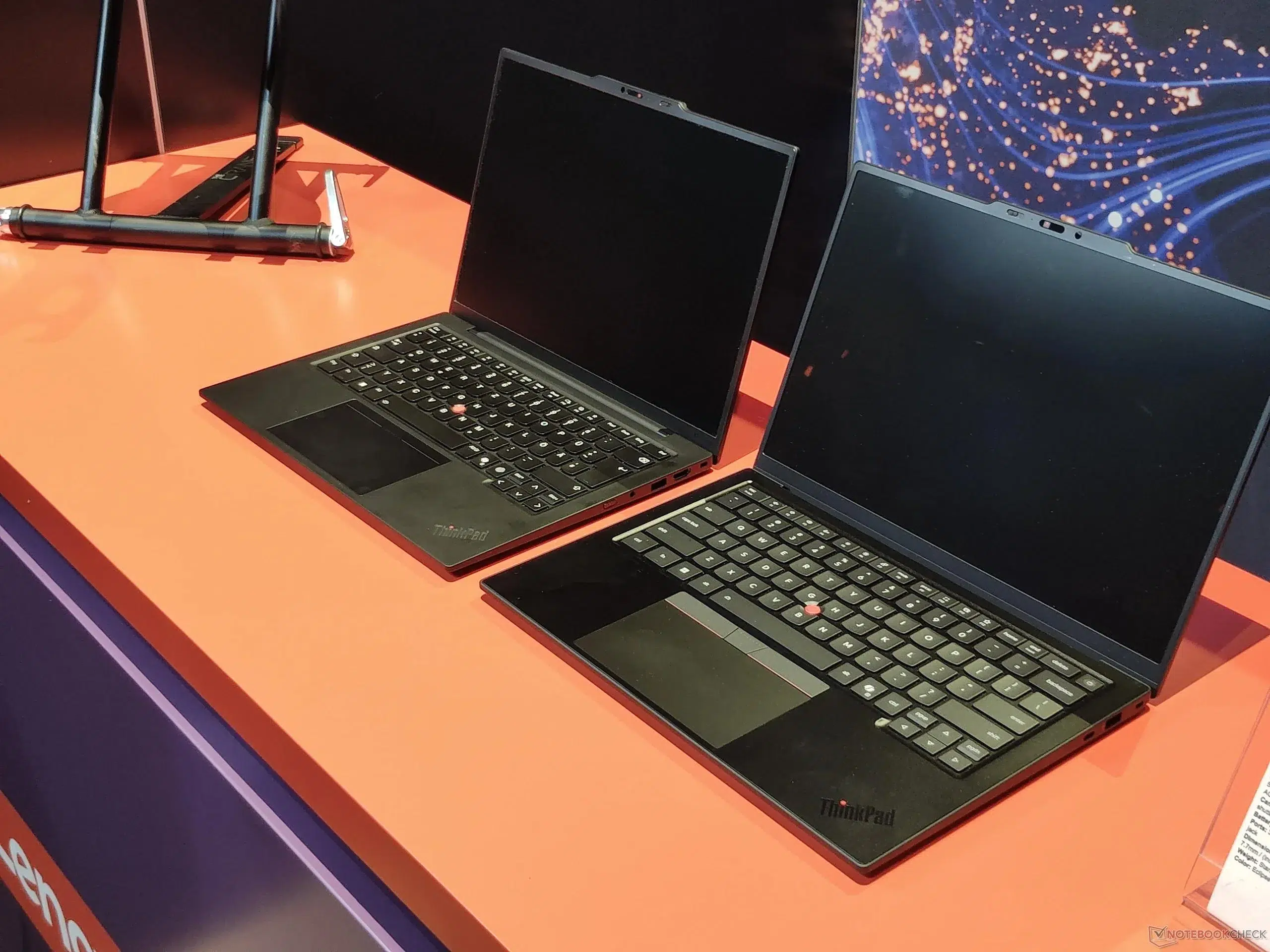
Choosing between the Lenovo ThinkPad X1 Carbon Gen 14 and Lenovo ThinkPad P16 Gen 3 is less about determining which laptop is universally “better” and more about determining what type of work you actually do.
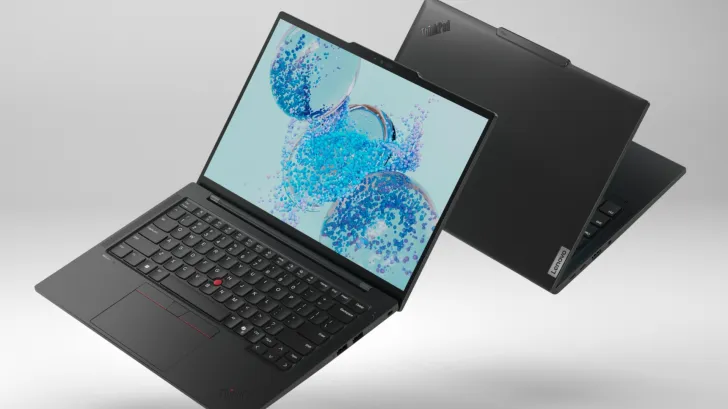
The ThinkPad X1 Carbon Gen 14 is Lenovo’s premium ultraportable business laptop. It prioritizes low weight, mobility, battery efficiency, enterprise security and everyday professional productivity. The ThinkPad P16 Gen 3 sits at the opposite end of the ThinkPad family: it is a high-performance mobile workstation designed for engineers, architects, creators, developers and professionals running demanding GPU-accelerated applications.
In simple terms:
Buy the ThinkPad X1 Carbon Gen 14 if portability, business productivity and travel are your priorities.
Buy the ThinkPad P16 Gen 3 if raw CPU/GPU performance, workstation applications and upgradeability matter more than weight.
That distinction becomes particularly important for buyers in Dubai and the wider UAE, where both models can cost substantially more than a mainstream business laptop. Choosing the wrong class of machine may mean paying for performance you never use – or buying an ultralight laptop that cannot efficiently handle your professional workload.
Lenovo itself positions the P16 Gen 3 as a mobile workstation with dedicated professional NVIDIA graphics, while the X1 Carbon Gen 14 is a premium Copilot+ business notebook.
ThinkPad X1 Carbon Gen 14 vs P16 Gen 3: Quick Verdict
| Category | ThinkPad X1 Carbon Gen 14 | ThinkPad P16 Gen 3 | Winner |
| Business productivity | Excellent | Excellent | X1 Carbon |
| Portability | Excellent | Fair | X1 Carbon |
| CPU-intensive workloads | Good–Excellent | Excellent | P16 Gen 3 |
| Professional GPU performance | Limited | Excellent | P16 Gen 3 |
| CAD/3D rendering | Light workloads | Professional workloads | P16 Gen 3 |
| AI/ML GPU workloads | Limited | Excellent | P16 Gen 3 |
| RAM upgradeability | No | Yes | P16 Gen 3 |
| Storage expansion | Limited | Excellent | P16 Gen 3 |
| Battery efficiency | Excellent | Good for workstation class | X1 Carbon |
| Travel | Excellent | Heavy | X1 Carbon |
| Ports | Good | Excellent | P16 Gen 3 |
| Corporate executives | Excellent | Overkill for most | X1 Carbon |
| Engineers/architects | Limited for heavy CAD | Excellent | P16 Gen 3 |
The difference is therefore straightforward: X1 Carbon is the better mobile business laptop; P16 Gen 3 is the better portable workstation.
Lenovo ThinkPad X1 Carbon Gen 14 vs P16 Gen 3 Specifications
Specifications vary by exact SKU, so buyers should always check the configuration rather than assuming every Gen 14 or P16 Gen 3 is identical.
For example, UAE Tech Dubai currently lists a ThinkPad X1 Carbon Gen 14 21V7006GUS with a Core Ultra 7 365 vPro processor, 32GB LPDDR5X RAM, 1TB SSD and 14-inch WUXGA touch display.
Its current P16 Gen 3 range includes significantly more powerful workstation configurations with Core Ultra HX processors and NVIDIA RTX PRO Blackwell graphics.
| Feature | ThinkPad X1 Carbon Gen 14 | ThinkPad P16 Gen 3 |
| Laptop type | Premium business ultrabook | Mobile workstation |
| Display | 14-inch | 16-inch |
| CPU family | Intel Core Ultra Series 3 | Intel Core Ultra HX |
| Graphics | Integrated Intel/Arc depending on configuration | NVIDIA RTX PRO Blackwell options |
| RAM | Up to 64GB depending on model, soldered | Up to 192GB non-ECC depending on configuration |
| RAM upgradeable | No | Yes |
| SSD expansion | Single M.2 architecture | Up to three M.2 drives |
| Battery | 58Wh | Up to 99.9Wh |
| Thunderbolt | Thunderbolt 4 | Thunderbolt 5 + Thunderbolt 4 |
| Ethernet | Adapter/dock dependent | Built-in RJ45 on applicable configs |
| SD reader | No | Yes |
| Numeric keypad | No | Yes |
| Ideal user | Executives/mobile professionals | Engineers/creators/AI professionals |
Lenovo’s official specifications confirm that the P16 Gen 3 can support up to 192GB of non-ECC memory and three M.2 storage slots, giving it a significant advantage for workstation expansion.
What Is the Main Difference Between the X1 Carbon Gen 14 and P16 Gen 3?
The biggest difference is their design philosophy.
The ThinkPad X1 Carbon Gen 14 is designed around mobility.
The ThinkPad P16 Gen 3 is designed around sustained performance.
An executive traveling between offices in Dubai, Abu Dhabi and Riyadh may benefit more from carrying an X1 Carbon every day than from having an RTX professional GPU sitting idle.
An architect working with complex Revit projects or an engineer using large SolidWorks assemblies has the opposite problem: saving weight is less useful if the laptop takes significantly longer to process professional workloads.
This is why comparing specifications without considering use cases can be misleading.
Design, Size and Portability
ThinkPad X1 Carbon Gen 14
Portability remains one of the strongest reasons to buy an X1 Carbon.
It is a compact 14-inch ThinkPad designed for people who work in offices, airports, client locations, coworking spaces and meeting rooms.
The UAE Tech Dubai Core Ultra 7 configuration uses a 14-inch display, 58Wh battery and compact chassis, while higher configurations retain the same mobility-oriented concept.
Independent testing also continues to position the Gen 14 as a thin-and-light flagship rather than a workstation replacement.
If your typical day involves a laptop bag, taxi, Dubai Metro, airport or multiple meetings, those differences matter considerably.
ThinkPad P16 Gen 3
The P16 Gen 3 uses a 16-inch workstation chassis.
A UAE Tech Dubai configuration is listed at approximately 2.54kg, with a 99.9Wh battery and much larger cooling/power requirements.
That isn’t unusually heavy for a powerful professional workstation, but it is dramatically different from carrying an X1 Carbon.
Portability winner: ThinkPad X1 Carbon Gen 14.
CPU Performance
This is one of the areas where buyers need to compare exact SKUs.
The X1 Carbon Gen 14 offers several Intel Core Ultra Series 3 processors. Lenovo’s official PSREF lists options ranging through Core Ultra 5, Core Ultra 7 and higher-end Core Ultra X7 configurations.
These processors are well suited to:
- Microsoft 365;
- large Excel files;
- browser-based applications;
- CRM systems;
- coding;
- analytics;
- video meetings;
- multitasking;
- light photo/video work.
The P16 Gen 3, however, can use much higher-power HX processors.
The UAE Tech Dubai configuration examined for this comparison uses a Core Ultra 9 275HX with 24 cores and up to 5.4GHz, paired with workstation-class hardware.
That matters for workloads such as:
- software compilation;
- simulations;
- CAD calculations;
- engineering software;
- CPU rendering;
- virtual machines;
- data analysis;
- professional content production.
CPU performance winner: ThinkPad P16 Gen 3.
For normal office work, however, that additional performance may provide little practical advantage.
Graphics Performance: Integrated Graphics vs NVIDIA RTX PRO
This is arguably the most important difference.
Most X1 Carbon configurations use integrated Intel graphics, although higher Series 3 options can provide significantly stronger integrated Arc graphics than older generations. Lenovo lists an integrated Intel Arc B390 GPU on selected Ultra X7 configurations.
That is suitable for business productivity, multimedia, light creative applications and some accelerated workflows.
The P16 Gen 3 operates in another category.
Lenovo offers NVIDIA RTX PRO Blackwell professional GPUs, extending as high as RTX PRO 5000 configurations.
Professional RTX graphics make the P16 dramatically more appropriate for:
- AutoCAD;
- SolidWorks;
- Autodesk Revit;
- CATIA;
- Blender;
- Maya;
- 3ds Max;
- Unreal Engine;
- Adobe Premiere Pro;
- DaVinci Resolve;
- GPU rendering;
- CUDA workloads;
- AI inference;
- machine learning.
Independent testing of the P16 Gen 3 also highlights CAD and local AI as core use cases for the machine.
Graphics winner: ThinkPad P16 Gen 3 by a large margin.
AI and Copilot+ Capabilities
AI PC marketing can make this comparison confusing because these laptops target different forms of AI computing.
The X1 Carbon Gen 14 is available as a Copilot+ PC, with a dedicated Intel NPU designed for efficient on-device AI features. Lenovo lists up to roughly 47–50 NPU TOPS depending on processor configuration.
This is useful for everyday AI-assisted PC features while preserving efficiency.
The P16 Gen 3 can pair CPU/NPU capabilities with massively more powerful NVIDIA RTX PRO GPUs.
So the distinction is:
Windows AI features and efficient everyday AI: X1 Carbon.
CUDA, local LLMs, professional AI development and GPU-heavy machine learning: P16 Gen 3.
RAM, SSD Storage and Upgradeability
Here the difference is substantial.
X1 Carbon Gen 14
Lenovo uses soldered LPDDR5X memory.
Depending on configuration, the laptop can be ordered with substantial RAM, but it cannot simply be upgraded later by installing additional SODIMMs. Official PSREF configurations show up to 64GB soldered memory.
That means buyers should purchase the amount of RAM they expect to need for the life of the laptop.
P16 Gen 3
The P16 is designed with workstation servicing and expansion in mind.
Lenovo specifies:
- four DDR5 SODIMM slots;
- up to 192GB non-ECC memory;
- up to 128GB ECC memory on supported configurations;
- three M.2 SSD slots;
- potential storage capacity reaching 12TB depending on configuration.
For engineers, data scientists and professionals working with enormous datasets or multiple VMs, this can be a decisive advantage.
Upgradeability winner: ThinkPad P16 Gen 3.
Display Comparison
Both laptops offer excellent display configurations, but for different users.
X1 Carbon Gen 14 display
Available options include premium 14-inch panels, with selected configurations offering a 2.8K OLED, 120Hz, 100% DCI-P3 display.
Its smaller footprint is particularly convenient for mobile work.
P16 Gen 3 display
The P16 provides a much larger 16-inch workspace.
The UAE Tech Dubai workstation configuration includes a 3840 × 2400 WQUXGA panel with 100% DCI-P3 coverage and up to 800 nits, making it particularly compelling for professional visual workflows.
For spreadsheets and travel, the X1’s smaller screen is sufficient.
For timelines, CAD drawings, 3D viewports, code windows and professional editing, the P16’s additional workspace can be valuable.
Professional-workspace winner: ThinkPad P16 Gen 3.
Portable-display winner: ThinkPad X1 Carbon Gen 14.
Battery Life and Charging
Battery capacity alone doesn’t determine runtime.
The X1 Carbon uses a smaller 58Wh battery, but its lower-power platform and integrated graphics are designed around efficiency.
Notebookcheck recorded exceptionally strong battery behavior from the Gen 14 during testing, reinforcing its suitability as an all-day business machine.
The P16 can carry approximately 99.9Wh, but it also has a high-performance CPU, discrete NVIDIA GPU and larger display.
Its larger battery therefore shouldn’t automatically be interpreted as longer runtime.
For traveling without constantly hunting for power sockets:
Battery/mobility winner: ThinkPad X1 Carbon Gen 14.
Ports and Connectivity
The P16 wins easily if you regularly connect professional equipment.
A P16 Gen 3 configuration can include:
- 2× Thunderbolt 5;
- Thunderbolt 4;
- 2× USB-A;
- HDMI 2.1;
- 2.5Gb Ethernet;
- SD Express card reader;
- headphone/microphone jack;
- Wi-Fi 7
The X1 Carbon remains capable, with Wi-Fi 7, USB-A, HDMI and Thunderbolt connectivity, but sacrifices some ports in the interest of size and weight.
Connectivity winner: ThinkPad P16 Gen 3.
Which Is Better for Business Professionals?
Choose the ThinkPad X1 Carbon Gen 14.
Typical business applications rarely need an RTX PRO GPU.
For:
- CEOs;
- managers;
- consultants;
- accountants;
- lawyers;
- sales professionals;
- digital marketers;
- project managers;
- corporate travelers,
The X1 Carbon offers a better balance.
It is easier to carry, powerful enough for demanding business multitasking, available with vPro configurations, and designed around enterprise productivity.
You can view the current Lenovo ThinkPad X1 Carbon Gen 14 in UAE here:
Lenovo ThinkPad X1 Carbon Gen 14 at UAE Tech Dubai
Which Is Better for Engineers, Architects and CAD?
Choose the ThinkPad P16 Gen 3.
If your daily workflow includes:
- AutoCAD;
- Revit;
- SolidWorks;
- CATIA;
- engineering simulations;
- BIM;
- 3D modelling;
- GPU rendering,
The workstation architecture makes far more sense.
The RTX PRO GPU, larger cooling system, high RAM ceiling and expansion capability give the P16 a clear advantage.
Independent testing similarly identifies CAD as one of the machine’s strongest use cases.
Which Is Better for AI, Machine Learning and Data Science?
For ordinary Copilot+ features:
X1 Carbon Gen 14 is excellent.
For serious local AI development:
P16 Gen 3 is the better machine.
A high-end RTX PRO Blackwell GPU provides vastly greater capability for appropriate CUDA-accelerated workloads than an integrated GPU.
Data scientists also benefit from the P16’s significantly higher memory ceiling and multiple SSD slots.
Which Is Better for Video Editing and Content Creation?
For occasional Photoshop, Canva, Lightroom and short video projects, the X1 Carbon Gen 14 is perfectly reasonable.
For:
- 4K/8K timelines;
- After Effects;
- Premiere Pro;
- DaVinci Resolve;
- GPU effects;
- 3D rendering;
- professional colour workflows,
choose the P16 Gen 3.
The combination of discrete NVIDIA graphics and larger high-resolution display creates a much stronger professional content-production environment.
Which Is Better for Developers?
It depends on the development workload.
Choose the X1 Carbon Gen 14 for:
- web development;
- Python;
- JavaScript;
- VS Code;
- Git;
- cloud development;
- SSH;
- Docker workloads that aren’t highly memory intensive.
Choose the P16 Gen 3 for:
- multiple heavy VMs;
- AI development;
- CUDA;
- game development;
- complex local containers;
- huge builds;
- workstation-class development.
Which Is Better for Frequent Travel in Dubai and the UAE?
This is one of the easiest decisions in the comparison.
Choose the X1 Carbon Gen 14.
If you regularly travel between Dubai, Abu Dhabi, Sharjah, GCC countries or international offices, carrying a compact business notebook is dramatically more convenient than carrying a large workstation and its higher-capacity power supply.
The P16 is “mobile” in the workstation sense.
The X1 Carbon is mobile in the everyday sense.
ThinkPad X1 Carbon Gen 14 Pros and Cons
Pros
- Excellent portability
- Premium ThinkPad business design
- Strong battery efficiency
- Copilot+ PC capabilities
- Intel vPro configurations
- Wi-Fi 7
- Premium OLED options
- Excellent for executives and corporate users
- Easy to travel with
- Windows 11 Pro options
Cons
- Soldered RAM
- Limited storage expansion
- No workstation-class NVIDIA GPU
- Smaller 14-inch screen
- Less suitable for heavy CAD/3D/AI workloads
ThinkPad P16 Gen 3 Pros and Cons
Pros
- Extremely powerful workstation platform
- NVIDIA RTX PRO Blackwell GPU options
- High-performance Intel Core Ultra HX CPUs
- Huge RAM capacity
- Four memory slots
- Multiple SSD slots
- Thunderbolt 5
- Built-in Ethernet
- SD card reader
- Excellent 16-inch display options
- Ideal for engineering and AI workloads
Cons
- Much heavier than X1 Carbon
- More expensive
- Higher power consumption
- Less convenient for daily commuting
- Overkill for ordinary office users
Lenovo ThinkPad X1 Carbon Gen 14 vs P16 Gen 3: Which Should You Buy?
The answer becomes simple once you define your workload.
Buy the ThinkPad X1 Carbon Gen 14 if you:
work primarily with Microsoft Office, browsers, cloud platforms, coding, communication tools and business software;
travel frequently;
want a lightweight premium ThinkPad;
need strong battery efficiency;
want Copilot+ PC capabilities;
or manage a corporate fleet where mobility matters.
Buy the ThinkPad P16 Gen 3 if you:
work in engineering or architecture;
use AutoCAD, SolidWorks, Revit or similar applications;
create professional 3D content;
edit demanding video projects;
develop AI/ML applications;
need NVIDIA CUDA;
use multiple virtual machines;
or need upgradeable RAM and multiple SSDs.
Overall Winner
There is no meaningful universal winner because they serve different markets.
For most corporate professionals:
ThinkPad X1 Carbon Gen 14 wins.
For workstation professionals:
ThinkPad P16 Gen 3 wins decisively.
That clear distinction is more useful than simply saying that the P16 is “faster.”
Where to Buy Lenovo ThinkPad Laptops in Dubai, UAE
If you’re ready to buy either model, UAE Tech Dubai, operated by Berjaya Electronics, currently lists both the ThinkPad X1 Carbon Gen 14 and multiple ThinkPad P16 Gen 3 configurations for UAE buyers. The store also maintains a much larger Lenovo catalogue and dedicated business-laptop category.
Recommended internal links for this article:
Lenovo ThinkPad X1 Carbon Gen 14
Shop Lenovo ThinkPad X1 Carbon Gen 14 in UAE
Lenovo ThinkPad P16 Gen 3
Shop Lenovo ThinkPad P16 Gen 3 in UAE
Lenovo laptops and PCs
Browse Lenovo Laptops in UAE
Business laptops
Shop Business Laptops in Dubai & UAE
When purchasing a professional laptop at this level, verify the exact SKU, processor, GPU, RAM, display and warranty before ordering, because both Lenovo families are sold in multiple substantially different configurations.
For buyers who need expert guidance choosing between portability and workstation performance, UAE Tech Dubai (Berjaya Electronics) provides Lenovo options for business users, corporate procurement teams, engineers, architects, developers and creators throughout Dubai and the wider UAE.
Is the ThinkPad P16 Gen 3 better than the X1 Carbon Gen 14?
For workstation performance, yes. The P16 Gen 3 offers much stronger CPU/GPU configurations, professional NVIDIA RTX graphics, upgradeable memory and significantly greater storage expansion.
For mobility and normal business work, however, the X1 Carbon Gen 14 is usually the better choice.
Which is better for business, X1 Carbon or P16?
The ThinkPad X1 Carbon Gen 14 is generally better for executives, consultants, office professionals and frequent travelers because it provides excellent business performance in a much more portable design.
Which Lenovo ThinkPad is better for AutoCAD?
The ThinkPad P16 Gen 3 is the better option for demanding AutoCAD, Revit, SolidWorks, BIM and professional 3D workloads because it can be configured with NVIDIA RTX PRO graphics.
Is the ThinkPad X1 Carbon Gen 14 good for programming?
Yes. It is an excellent development laptop for web development, Python, JavaScript, cloud engineering, VS Code and general software development. Developers requiring extensive local virtualization, GPU computing or AI workloads may benefit more from the P16.
Can you upgrade the RAM in the X1 Carbon Gen 14?
No. Lenovo specifies soldered LPDDR5X memory on X1 Carbon Gen 14 configurations, so buyers should select sufficient RAM when ordering.
Can you upgrade RAM in the ThinkPad P16 Gen 3?
Yes. Lenovo specifies four DDR5 SODIMM slots and support for up to 192GB non-ECC memory on appropriate configurations.
Which laptop is better for AI development?
The P16 Gen 3 is substantially better for serious AI/ML workloads because of its NVIDIA RTX PRO GPU options and larger memory capacity. The X1 Carbon is better suited to efficient NPU-based Copilot+ PC features.
Which has better battery life?
The X1 Carbon Gen 14 is generally the more battery-focused platform. Its low-power architecture and integrated graphics are specifically designed for mobile business use, and independent testing has demonstrated very strong battery results.
Which is better for travelling?
The ThinkPad X1 Carbon Gen 14. The P16 Gen 3 is transportable but is fundamentally a workstation rather than an ultraportable laptop.

Leave a Comment
Your email address will not be published. Required fields are marked *