
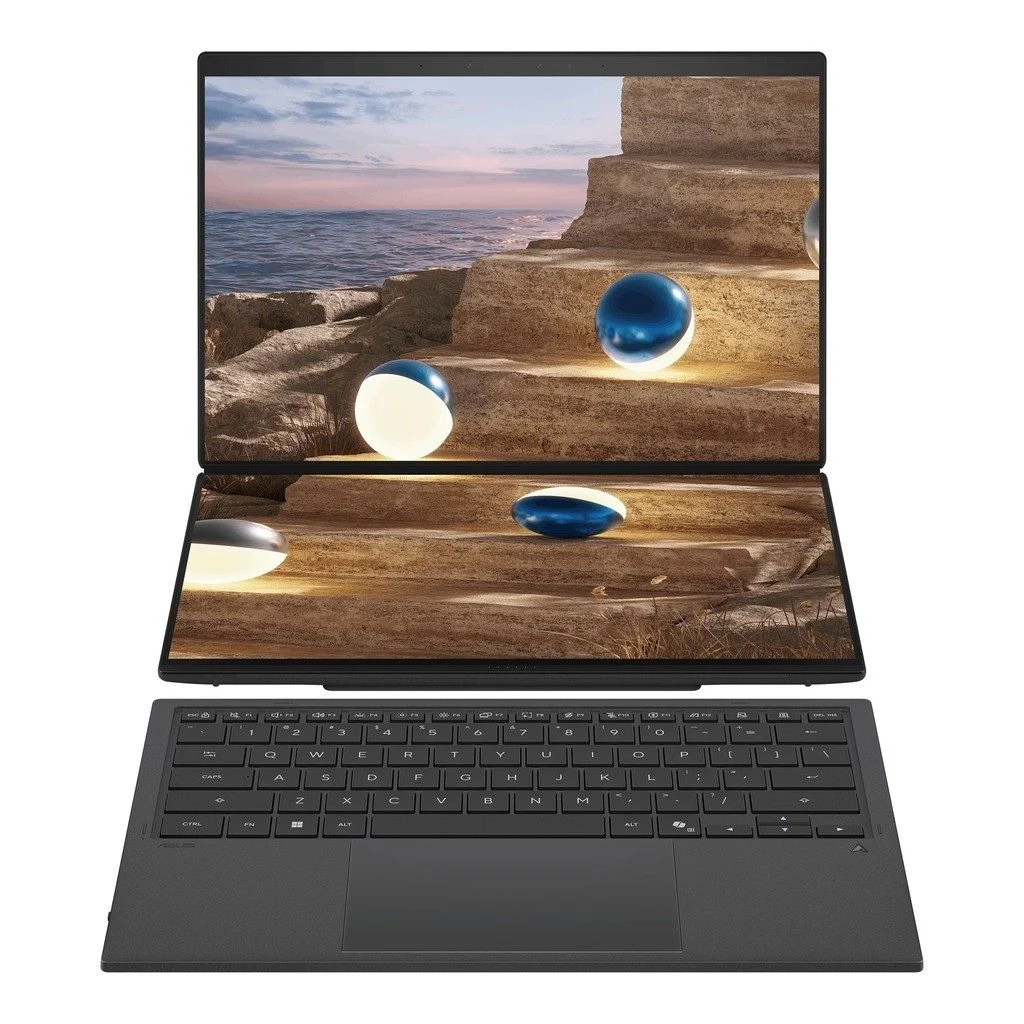
Choose the ASUS Zenbook DUO if you want dual screens with a detachable keyboard and physical touchpad, plus built-in HDMI and USB-A. Choose the Lenovo Yoga Book 9i if flexible convertible modes are your priority and you are comfortable with its different keyboard and pointer setup. Neither is automatically the best dual-screen laptop for everyone: your desk space, applications and daily setup routine matter as much as specifications.
This ASUS Zenbook DUO vs Lenovo Yoga Book 9i guide compares the UX8407AA listing with Lenovo’s Yoga Book 9 14IAH10, SKU 83KJ0001US. The store uses “Yoga Book 9” in the product name. Older 13.3-inch Yoga Book models have different specifications, so do not mix their reviews with this 14-inch comparison.
ASUS Zenbook DUO vs Lenovo Yoga Book 9i: UAE prices
| Specification | ASUS Zenbook DUO UX8407AA | Lenovo Yoga Book 9 14IAH10 |
|---|---|---|
| Configuration compared | Store UX8407AA listing | 83KJ0001US |
| Processor | Core Ultra X9; exact number requires confirmation | Intel Core Ultra 7 255H |
| Memory / storage listed | 32GB / 1TB SSD | 32GB / 1TB SSD |
| Graphics | Integrated Intel Arc | Integrated Intel Arc |
| Displays | Two 14-inch 3K OLED touchscreens | Two 14-inch 2.8K OLED touchscreens |
| Operating system listed | Windows 11 Pro | Windows 11 Home |
| Listed price, 18 November 2026 | AED 11,399 | AED 9,750 |
| Stock status, 18 November 2026 | In stock | On backorder |
These catalogue prices and stock statuses were checked on 18 November 2026. The ASUS is AED 1,649 more than this Lenovo configuration. Prices can change; backordered items require a confirmed dispatch estimate.
View the ASUS Zenbook DUO UX8407AA price in UAE and Lenovo Yoga Book 9 14IAH10 configuration before placing an order.
An important ASUS processor detail to confirm
The ASUS listing’s title says Core Ultra X9 378H, while its specification details mention 388H. ASUS’s official UX8407 announcement lists a Core Ultra X9 388H option. Ask the store to confirm the exact processor against the supplied unit or written quotation. This guide does not treat the conflicting numbers as interchangeable or claim a measured performance advantage.
Two OLED screens: what is the real benefit?
A dual-screen laptop can keep a reference document visible while you write, show a video meeting above your notes, or place a spreadsheet beside its source data. It is especially useful when you repeatedly work away from an external monitor. The benefit is reduced window switching; an extra screen does not make the processor faster.
For a Dubai consultant working from different offices, a portable two-screen setup may be convenient. For someone who already spends every day at a large desktop monitor, a conventional laptop and dock may offer better value. Both approaches deserve consideration before you pay for the specialist design.
ASUS describes the UX8407 with dual 2880 × 1800 OLED touch displays at up to 144Hz. Lenovo specifies the same 2880 × 1800 resolution for the 14IAH10 panels, at up to 120Hz. The “3K” versus “2.8K” labels therefore do not establish a pixel-count advantage here. Check text scaling, reflections and your preferred layout, rather than judging by the marketing label alone.
Keyboard, touchpad and screen modes
The ASUS has a detachable Bluetooth keyboard with a physical touchpad and an integrated kickstand. This gives buyers who prefer a familiar pointer surface a straightforward reason to shortlist it. ASUS also provides ScreenXpert software for managing the extra screen.
Lenovo’s specification lists a Bluetooth keyboard without a physical touchpad and a 360-degree hinge supporting laptop, tent and tablet modes. Confirm which keyboard, stand, pen and other accessories are included with the exact order. A virtual pointer surface or separate mouse changes how much space you need and how quickly you can set up.
Before buying, picture your smallest regular workspace. Can it hold the laptop, keyboard and any separate mouse? Can you use your preferred layout during a meeting without rearranging everything? For a closer look at practical layouts, read our guide to using Lenovo Yoga Book 9 dual screens.
Which is better for coding, business and study?
- Coding: keep an editor on one screen and documentation or a preview on the other. Check the memory needs of containers, virtual machines and your development tools.
- Business: use one screen for a proposal and the other for spreadsheets or source documents. Consider Windows edition requirements before a company purchase.
- Study: display course material beside notes. Confirm compatibility with required exam and teaching software, and whether a simpler laptop meets your needs for less.
- Creative work: use the extra display for tools or references, but check your application’s graphics requirements separately.
Both compared listings have 32GB RAM and integrated Intel Arc graphics. That does not make them equivalent to a laptop with a dedicated NVIDIA GPU. If your renderer requires CUDA or your project needs substantial dedicated graphics memory, compare suitable laptops with dedicated graphics and workstation options instead. We have not run side-by-side benchmarks on these units.
Ports and battery life for mobile work
ASUS lists two Thunderbolt 4 ports, HDMI, USB-A and an audio jack. Lenovo lists three Thunderbolt 4 ports. The ASUS arrangement can reduce adapter needs for older USB peripherals and HDMI projectors; with Lenovo, budget for the appropriate hub or adapter if your equipment needs one.
The manufacturer battery capacities are 99Wh for the ASUS and 88Wh for the Lenovo. Capacity alone does not prove which lasts longer in your workflow. Running two bright OLED panels, video meetings and background applications can change runtime considerably. Compare tests under similar conditions and include keyboards, stands, adapters and chargers when judging travel weight.
Buying a dual-screen laptop in Dubai, UAE
Ask for a written quote covering the exact SKU, processor, keyboard layout, included accessories, warranty provider and final amount including any applicable VAT and delivery charges. Confirm ASUS’s processor discrepancy and Lenovo’s backorder timing before committing. Check the shipping information and returns policy, particularly if you have not tried this style of laptop before.
Frequently asked questions
Is the ASUS Zenbook DUO better than the Lenovo Yoga Book 9i?
It is the more natural shortlist choice if you want a physical touchpad, integrated stand and built-in HDMI. The Lenovo deserves consideration if you value convertible modes and its lower listed price. Your preferred setup matters more than declaring one universal winner.
Are these dual-screen laptops good for gaming?
They are primarily worth considering for portable multitasking. Game suitability depends on the specific integrated GPU, title, resolution and settings; do not expect the extra display to improve gaming performance.
Does a dual-screen laptop replace two desktop monitors?
It offers a portable alternative for some workflows, but two 14-inch screens have less physical working area than larger desktop monitors. Test your applications at a comfortable text size before relying on it as your only setup.
Conclusion: choose the setup you will use every day
Choose the ASUS Zenbook DUO for a familiar keyboard-and-touchpad workflow and its range of built-in ports, after confirming the exact processor. Choose the Lenovo Yoga Book 9i configuration for convertible flexibility and its lower listed price, after checking accessories and delivery timing.
At UAE Tech Dubai, browse valuable products for work and study, including laptops available to order and laptop accessories. Contact our Dubai store for current stock, configuration and warranty details so you can select the right equipment for your needs.
Specification sources: ASUS Zenbook DUO UX8407 announcement and Lenovo Yoga Book 9 14IAH10 specifications. Manufacturer options can vary by region and configuration; store links above identify the listings compared.


Leave a Comment
Your email address will not be published. Required fields are marked *